

Codex on any model: magpie makes Codex Router unnecessary
Models end up scattered everywhere: one OpenRouter account, separate API keys for DeepSeek and Kimi, separate subscriptions for Cursor, Copilot and Grok. On top of that, Codex, Claude Code and OpenCode each ship their own model picker with its own configuration, so switching Codex to a cheaper model means remembering how to edit config.toml by hand.
magpie (source, catalog entry: magpie) is a free, MIT-licensed menu bar app built for exactly this. It runs a local gateway on 127.0.0.1:3425, collects every provider you add and every subscription you are signed into, and hands the combined model list to every agent installed on your machine.
One panel for every provider and subscription
Open magpie's Providers panel and OpenRouter (24 models), OpenCode Zen and OpenCode Go sit next to Codex (ChatGPT), Copilot, Cursor and Grok, the subscription-backed entries that reuse an existing sign-in. The "Add a provider" section below has a row of Subscriptions tiles too: Claude, ChatGPT, Cursor, Grok and Copilot, each a sign-in away with no key to paste.
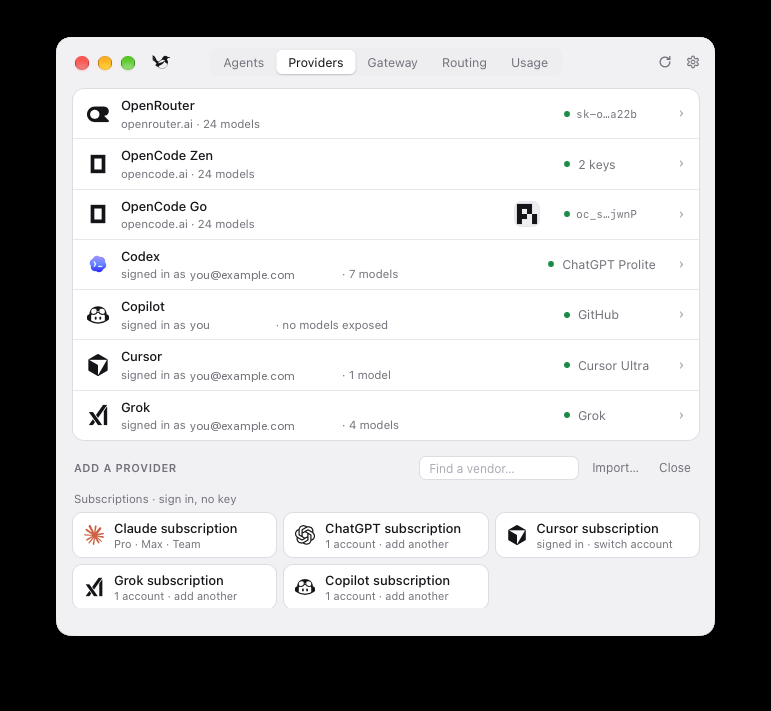
"Reusing a subscription" does not mean copying a key into a second place. magpie reads the agent's own credential file directly (Codex keeps its ChatGPT login in ~/.codex/auth.json, for example) and refreshes tokens the same way that agent does. Sign out inside that agent and the provider disappears from magpie too; nothing extra is stored on disk.
Codex's own picker sees every model
Once Codex points at a provider, its native model picker lists entries like "MiMo-V2.6-Flash · OpenRouter", "Grok 4.7 · OpenRouter" and "Big Pickle · OpenCode Zen" directly, no second panel to open and no separate router project to install first. Codex stays Codex.
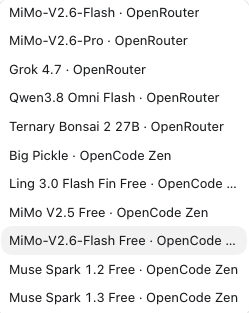
This is the biggest difference from Codex Router, which we wrote about earlier. Codex Router is a solid idea: when your Codex quota runs low, it wires DeepSeek or Grok into Codex so you can keep working in the same workspace. magpie solves the same underlying problem in a lighter way. There is no separate router project to install, no setup steps to remember, just a menu bar app you click through. It is also not Codex-only: Claude Code, OpenCode, Gemini CLI and other agents draw from the same provider list. If you already use Codex Router, magpie is not a replacement for it, just a broader, lower-effort path to the same result.
How the gateway works
Codex only speaks the OpenAI Responses API. Claude Code only speaks the Anthropic Messages API. Gemini CLI speaks Google's own format. The local gateway magpie runs accepts all of them: pick a model, and magpie translates the request into whatever format the chosen provider understands, streaming and tool calls included.
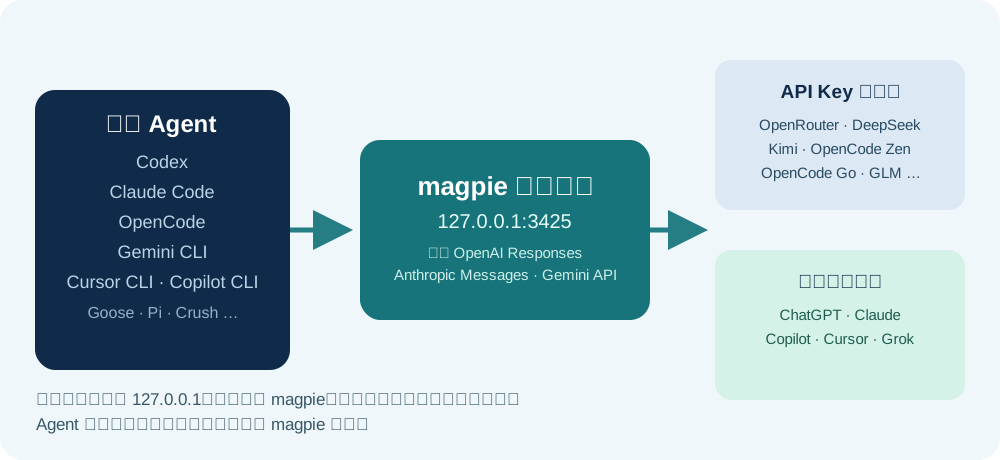
For Codex specifically, magpie edits configuration surgically. It adds a [model_providers.magpie] table to ~/.codex/config.toml and writes a ~/.codex/magpie-models.json catalog file, which is what makes new models show up in Codex's own list. Switching back to a native model undoes all of it, and your ChatGPT sign-in is never touched. Model lists are not hardcoded either. magpie asks each vendor which models it currently serves and fills in names and reasoning effort from the models.dev catalog, so a model released this morning shows up in the picker on the next refresh.
Getting started in a few steps
- Download the desktop app from usemagpie.ai, or install from a terminal:
curl -fsSL https://usemagpie.ai/install.sh | sh - Open the Providers panel and add a provider (paste an OpenRouter key, for example), or use a Subscriptions tile if you are already signed into Claude, ChatGPT, Cursor, Grok or Copilot, no key needed.
- Switch to the Agents panel, click the Codex row, and pick a model from the list that opens.
- Fully quit and reopen Codex, or start a new session. Configuration changes apply to the next session, not one already running.
What to watch for
magpie is still a young project, so treat it like early software: try it on something that is not mission critical first, and pin a version before you rely on it for important work. The feature that saves you a re-login, reading the agent's own credential file directly, also means magpie touches those local files. Check the relevant vendor's terms before routing a subscription into a different agent. Configuration changes only take effect on the next session, an already-running window will not pick them up automatically. And the gateway only listens on loopback, but any other process on the same machine can still reach that port; it is not fully isolated.
In one line: models no longer need to stay scattered across a dozen providers and subscriptions. magpie collects them into one panel, Codex keeps working the way it always has, and you no longer need a separate router to get there. If you have not read our earlier piece on why the model picker matters, see this article.
Sources: magpie's website, the GitHub repository (full README and configuration details).
Comments
No comments yet. Be the first to comment!
Related Tools


Related Articles

What Locks Codex Is the Picker, Not the Models
You already pay for OpenCode Go, Grok, and Z.ai, but the Codex picker still shows mostly GPT. The community project codex-router does not teach another install ritual. It puts subscriptions you already bought back into the selector, keeps keys on the machine, and leaves native GPT alone.

Running low on ChatGPT Codex quota? Switch to DeepSeek or Grok inside Codex
Codex Router lets you keep your Codex workspace while using DeepSeek, Grok, and other external models. A plain-English guide to routing, quotas, and network access.
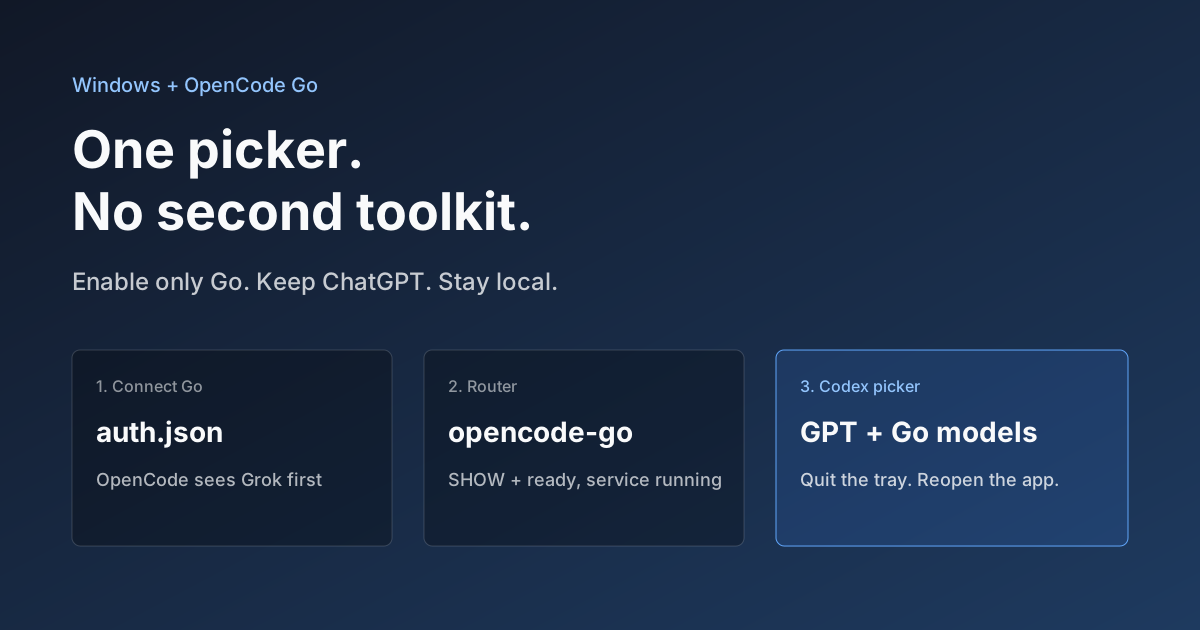
Hook OpenCode Go into Codex on Windows. Do Not Open a Second Toolkit.
A ChatGPT-signed Codex desktop app still shows mostly GPT in the picker. On Windows, enable only OpenCode Go and the Grok, GLM, Kimi, DeepSeek, and MiniMax models you already pay for appear in the same selector. Keys stay local. Native GPT stays put.
